AI Fivebimfivebim.com
AI assistant for the FiveBIM ERP. It helps construction teams get information without digging through modules, learn how to use the system, cross data with tools like SAP and Autodesk, and generate custom reports.
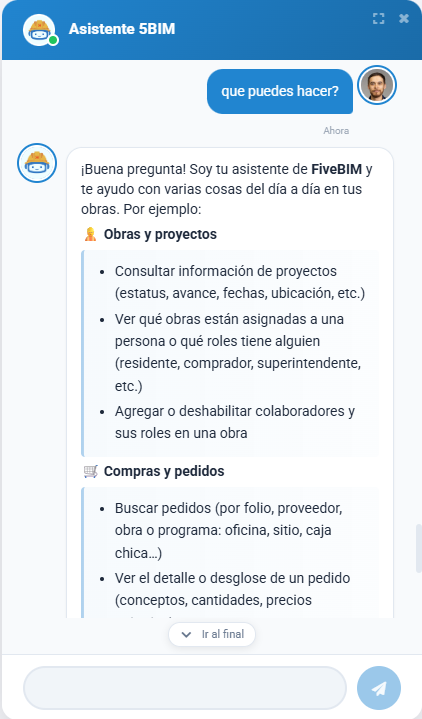 Simple question
Why did we build this?
FiveBIM holds a lot of operational data: projects, procurement, estimates, billing, checklists, Autodesk files, and more. People still needed a faster way to get answers and to combine that information with other tools they already use, like SAP, Autodesk Forma and OPUS (Budgeting software).
Opening several modules, exporting spreadsheets, and reconciling numbers by hand was slow. Documentation existed, but it was hard to find at the moment someone was stuck. We needed an assistant that could:
- Answer questions about projects, purchase orders, estimates, billing, users, and related records.
- Help people use the system by pointing them to documentation and the right workflow.
- Cross data across FiveBIM and external platforms such as SAP and Autodesk.
- Generate custom reports when a standard screen was not enough.
The first version of this product was a chat bot. It started on Google Chat with slash commands and structured cards for things like project lookup (/obra) and purchase orders (/oc). That worked for a small set of questions, but it could not keep up with the way people actually ask for information.
We rebuilt it as an AI assistant. The model talks to FiveBIM through MCP tools, respects role and project permissions, and asks for confirmation before write actions. The same backend now serves Google Chat and the assistant inside FiveBIM web and mobile, with conversation memory, streaming answers, and usage reports so we can see what people actually ask for.
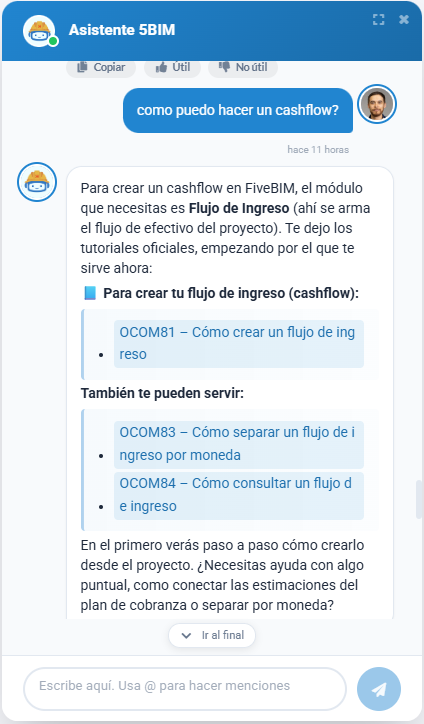 Documentation
My participation
I am the original author and main contributor of this project, and I designed the architecture.
I defined how the assistant connects to FiveBIM: the MCP tool layer, permission checks by role, write confirmations, conversation persistence, and the shared API used by Google Chat and the FiveBIM apps.
As the product grew I kept owning the core design while other developers contributed tools, prompts, and product features on top of that foundation.
The tech stack
For this project we used Node on the backend and an LLM connected to FiveBIM through MCP.
- Assistant
- LLM via the Open router
- MCP client and tools against FiveBIM, SAP, and Autodesk
- Role and project permissions
- Write-action confirmations
- Conversation memory (Sequelize / MySQL)
- SSE streaming for FiveBIM web and mobile
- Channels
- Google Chat
- FiveBIM web and mobile
- Local CLI for development
- Backend
- Node.js
- Express
- Botkit
- Jest
- Internal npm packages
- Other
- Usage analysis and HTML adoption reports (Puppeteer)
- Docker / PM2 for deploy
- GitHub Actions for CI/CD